Can you get hacked by replying to a text? What you need to know


A plain text reply usually can’t give hackers control of a device, install malware, or steal data. Modern mobile operating systems often separate messaging from the rest of the system, or use layered protections like sandboxing and permission requests. So, attacks that do real damage typically require something more, like clicking a link, opening an attachment, or being tricked into handing over information. But that doesn’t mean replying is risk-free.
Replying vs. clicking a link or downloading a file
Unless the reply contains any sort of sensitive information, like personally identifiable information (PII) or account details, it’s unlikely that it can provide attackers with what they need to hack a device or accounts.
Clicking on a link or attachment is riskier. A link can redirect potential victims to a fake site aimed at harvesting credentials, but even then, if the user doesn’t provide any details, the risk of being hacked is generally low. An attachment is more direct: opening it might trigger a malware download, install spyware, or execute code that gives an attacker access to the device.
What about zero-click attacks?
Zero-click attacks can compromise a device without the target clicking anything at all. Instead, they usually exploit vulnerabilities in the way apps automatically process data. These attacks are real but expensive to develop, difficult to execute, and typically target specific individuals or high-value targets. For the average phone user, the realistic day-to-day threat is far simpler than that.
Why scammers want you to reply
A plain response offers very little for a hack, but it can provide scammers with just enough to make someone a target. Here’s what replying usually tells scammers:
Replying confirms your number is active
Many scammers send texts in bulk just to see which numbers respond. A reply confirms the number is real and someone is actively using it, which makes it valuable. From there, scammers can keep the number for further targeting or pass it on to others. This can eventually lead to more attempts now that they know messages reach a real person.
How social engineering escalates from a single response
Social engineering uses psychology rather than code to extract information or money. A reply lets scammers know that their target is willing to interact and start sending more targeted follow-up messages based on how you respond.
Some scammers take a more gradual approach, building trust over days or weeks before introducing a request, a fake opportunity, or a reason to move the conversation to another platform, where the interaction feels more personal.
What scammers are hoping you’ll do next
The end goal is usually a specific action. That might be clicking a link, opening an attachment, sharing a password, revealing a one-time authentication code, sending money, or providing enough personal detail to enable identity theft. In longer scams, the request for money may not come for days or weeks, until the scammer believes enough trust has been established.
How to recognize a scam text
Scam texts change their details regularly, but the patterns are usually consistent. Knowing what to look for makes it easier to identify a suspicious message before engaging with it.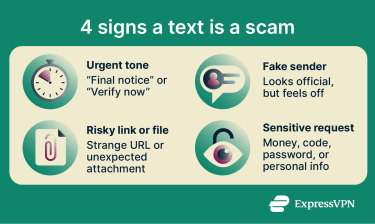
Urgent language and emotional pressure
Many scam texts use urgent language to pressure potential victims into acting before they think, with phrases like "final notice," "your account has been suspended," or "immediate action required.” When a text feels urgent, it becomes easier to focus on the problem it claims to solve and miss the red flags around it.
Unknown numbers and spoofed senders
An unknown number, especially one that’s from a different area, should raise suspicion. But scam texts don’t always come from obviously unfamiliar numbers. Spoofing allows scammers to disguise the origin of a message, making it appear to come from a bank, a government agency, a delivery company, or even a saved contact. Some might even use numbers that match local area codes to make it more believable. If it’s an unexpected message or one that doesn’t make sense for that sender, it might be a scam.
Suspicious links and unexpected attachments
Links in scam texts often lead to phishing sites designed to harvest credentials or payment details. Scammers might use shortened URLs to conceal the true destination, so the potential victim would only see the real site after clicking on it. Others may rely on typosquatting, a practice of registering domains that closely mimic legitimate ones with a misspelling, an added word, or an unexpected top-level domain (TLD) like .info instead of .com.
Scammers also use file attachments as a delivery method. They may label an executable file with a double extension, like pdf.exe, to make it look like a document. If the potential victim downloads and runs the file, it could execute malicious code in the background.
Requests for money, codes, or personal information
One of the clearest signs of a scam is a text asking for money, login details, Social Security numbers (SSNs), gift cards, bank details, or one-time codes. Legitimate institutions, banks, and businesses may send alerts over text, but they typically don’t ask for transactions or highly sensitive information.
Common text scams to watch for
Scammers recycle a few message formats because they’re familiar, believable, and easy to scale. Recognizing the setup can help you catch the scam.
Fake delivery and missed package texts
These scams impersonate delivery companies like FedEx, UPS, or DHL, claiming a package couldn’t be delivered or that a small fee is required to release it. The message typically includes a link to a fake payment or redelivery page designed to harvest payment details or personal information.
The scams are effective because the timing often feels plausible.
Bank and account verification scams
These messages impersonate banks or financial institutions, claiming there has been suspicious activity on an account or that immediate verification is required to prevent it from being locked.
Scammers direct potential victims to a fake login page to harvest credentials or pressure them into sharing a one-time code that can enable login or authorize a transaction. In some cases, they follow up with a phone call from someone posing as a fraud representative to make the interaction feel more legitimate.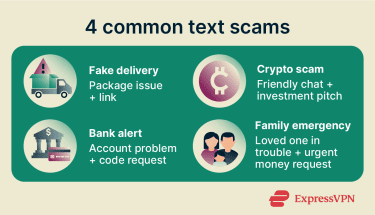
Crypto and investment scams
These scams often start with a wrong-number text that develops into a conversation. Once scammers establish trust, they introduce a fake investment platform, often crypto-based, that appears to generate strong returns.
Potential victims are encouraged to deposit funds and may be shown fabricated profits to build confidence before a larger deposit is requested. When they attempt to withdraw, they may be told that additional fees are required first or that funds are not available for withdrawal.
Family emergency scams
These messages impersonate a family member or close contact claiming to be in urgent need of money. The scenario varies; it might be a stolen phone, a car accident, legal trouble, or an emergency abroad, but in most cases the ask is financial and urgent.
Scammers pressure potential victims to act quickly and quietly, often before they have a chance to verify the claim through another channel. Some of these scams go further by using voice-cloning technology to make follow-up calls sound like a loved one.
What to do if you get a suspicious text
The right response depends on how far the interaction has already gone.
If you haven't replied yet
If you haven’t responded, you’re in the best position. Don’t reply and don’t click on any links or open attachments. If the message appears to come from a legitimate organization, verify it separately through the official app, website, or phone number. Don't use the text itself as the path to verification.
If you already responded
If you’ve replied, avoid further interaction. Then consider what was shared. If the response was generic, the main risk is more scam attempts.
If a link was clicked, a one-time code shared, login details provided, or personal information given, treat it as a serious incident. Change the password on the affected account, enable two-factor authentication (2FA) where possible, contact the relevant bank or institution, and monitor accounts for unusual activity. In the U.S., you can also file a complaint at ReportFraud.ftc.gov to log and track the incident.
How to report and block the sender
Regardless of whether you’ve responded or not, you should block and report the sender. If you’re in the U.S. or the U.K., forward the message to 7726. This is the official shortcode used by carriers there to receive and investigate scam text reports. You can then block the number and delete the text.
How to protect yourself from scam texts
You can’t stop every scam text from reaching your phone, but you can make them less likely to work.
Use built-in spam filters and carrier tools
Most smartphones have built-in spam filtering that can flag or separate suspicious messages. These filters don’t typically catch every scam text, but they can reduce the number of scam texts that make it to the main inbox.
- On iPhone: Go to Settings > Messages and enable Filter Unknown Senders to separate texts from unfamiliar numbers.
- On Android: Open the Messages app, go to Settings > Spam protection, and turn that feature on. Most phones also let you block the sender directly from the message thread.
Many carriers also offer extra spam-filtering tools, some free and some paid, that can reduce both scam texts and scam calls.
Learn more: How to stop getting spam texts and stay safe.
Verify unexpected messages through official channels
If a message claims to be from a bank, delivery company, or government agency, verify it independently. Open the official app, visit the official website directly, or call a number already on file. Never use a link, phone number, or email address provided in the suspicious message itself.
Use a separate number for sign-ups
Using a virtual number or a secondary number for shopping accounts, newsletters, app sign-ups, and other lower-trust uses reduces the chances of your primary number ending up on a marketing list or in a data breach.
FAQ
Can scammers hack your phone without you clicking anything?
Can opening a text message infect your phone?
Should you reply STOP to spam texts?
Can someone steal your identity from a text reply alone?
How can you tell if a text from your bank is real?
What should you do if you gave away personal information?