
Metadata explained: What it is, why it matters, and how to protect it



Metadata is part of many everyday digital activities, from taking photos and sending emails to creating documents and browsing websites. Although it often goes unnoticed, it plays an important role in how digital content is organized, shared, and understood.
This article explains why metadata matters and outlines some of the main privacy and security considerations around it.
What is metadata?
Metadata means “data about data.” It's structured information that describes, explains, locates, or facilitates the retrieval, use, or management of a resource. In simple terms, metadata provides context about a file, message, image, webpage, or other digital item rather than being the main content itself.
For example, a photo can include the date it was taken, the device used, and sometimes the location. A document can include the author, file type, and revision history. An email can include routing details, timestamps, and sender information. This kind of data helps systems organize content, display it correctly, and make it easier to search or manage.
Metadata is not the same as cookies or trackers. Cookies are small pieces of data used by websites and browsers to remember state or settings, while trackers are technologies that collect information about activity across pages, sites, or services. Sometimes the two overlap in privacy discussions because cookies can be used for tracking, but metadata more broadly describes the characteristics or context of a digital item.
Also read: How your digital footprint can impact your life.
How does metadata work?
Metadata works by attaching structured fields to a digital object or storing them in a connected system, such as a database or content management platform. Software reads those fields to identify what the object is, when it was created, who created it, how it should be handled, and how it relates to other content.
When metadata is accurate and standardized, systems can handle digital content more consistently and with less manual effort. When it’s incomplete, inconsistent, or outdated, information can be harder to manage, more likely to be misplaced, and more likely to unintentionally expose sensitive details.
Metadata examples
Metadata appears in many types of digital content. Some of it is visible, while some remains in the background. The examples below show how metadata works in images, documents, and websites.
Metadata in images
Digital photos often contain metadata that describes the file beyond the image itself. A common standard for this is Exchangeable Image File Format (EXIF) metadata, which can store details such as the date and time the photo was taken, the camera or phone model, image dimensions, file size, exposure settings, lens information, and sometimes GPS coordinates.
Depending on the device, file type, and settings, image files may also include orientation data, color profile information, and the software used to process or edit the image.
This metadata helps devices and apps handle photos more accurately. For example, a photo app can use it to sort images by date, group them by device, display them with the correct rotation, or show technical details about how the image was captured. In many cases, this information is created automatically when the photo is taken, without any manual input from the user.
Metadata in documents
Documents, spreadsheets, and presentations can contain metadata about the file’s identity, structure, and editing history. In Microsoft Office files, this can include the author name, title, subject, keywords, comments, tracked changes or revision information, custom Extensible Markup Language (XML) data, and standard document properties such as creation date. Some files also include statistics such as page count, word count, or editing time.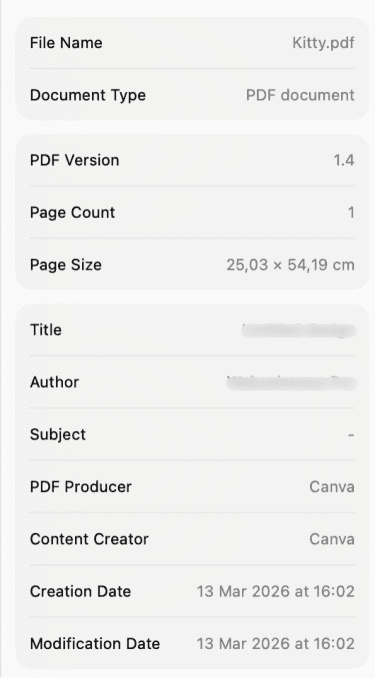
This kind of metadata helps software and file-management systems identify and organize documents more effectively. A document management system, for example, may use metadata fields to sort files by author, search by title or keyword, or track when a file was last updated. Some metadata is added automatically by the program, while other fields can be entered or edited manually, depending on the file format and software being used.
Metadata in websites
Websites use machine-readable metadata in the HTML <head> section to provide information about a page to browsers, search engines, and other systems. This information is usually not displayed as part of the main page content, but it helps define how the page should be described, interpreted, and processed. Common examples include the page title, meta description, canonical URL, robots directives, character encoding, and viewport settings for mobile display.
These fields serve different purposes. Some help identify or summarize the page, while others provide technical instructions about indexing, rendering, or linking. For instance, the title helps define how a page is presented in browser contexts, while a canonical tag indicates the preferred version of a page when similar URLs exist.
In content management systems and search engine optimization (SEO) tools, these fields are often shown in editable settings panels rather than directly in the visible page body.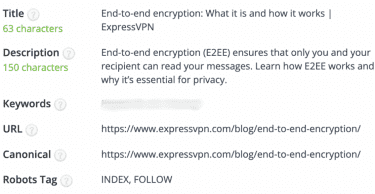
Also read: How much can metadata reveal?
Why metadata matters
Metadata affects more than file descriptions or technical settings. It plays a practical role in how information is maintained, presented, and governed across different digital environments.
Metadata in data management
In data management, metadata helps maintain order and continuity over time. It records details about a resource’s origin, format, structure, and history, which makes it easier to preserve meaning as data is stored, transferred, updated, or reused. This is especially important in research, archives, and other settings where information needs to remain understandable and usable long after it was first created.
How metadata influences SEO
For websites, metadata helps search engines interpret and present content. Elements such as the page title, meta description, canonical URL, and robots directives can influence how a page is indexed, which version is treated as the main one, and how it appears in search results. While older tags, such as meta keywords, no longer play a meaningful role for Google, other metadata still helps define how a page is handled and displayed.
Why metadata is important for businesses
In business environments, metadata helps organizations keep data systems transparent and manageable. It can help document data owners, support lineage tracking, clarify how data moves between systems, and make it easier to apply governance or compliance rules consistently. This becomes especially important in large organizations, where data is often spread across multiple tools, teams, and workflows.
Common types of metadata
Metadata can be grouped in different ways depending on the system, industry, or standard being used. The categories below are some of the most common ways metadata is used to describe, manage, preserve, and govern digital resources.
- Descriptive metadata: Used to identify and describe a resource so it can be recognized, understood, and found. Common examples include the title, author, subject, abstract, and keywords. In library and archive contexts, this is one of the core metadata categories because it supports discovery and basic identification.
- Structural metadata: Shows how the parts of a resource are organized and how they relate to one another. This can include chapters in a book, pages in a document, files within a digital object, or the structure of a dataset. It helps systems present and manage complex resources as a whole rather than as unrelated pieces.
- Administrative metadata: Supports the management of a resource over time. It can include information needed for storage, handling, permissions, preservation, and repository workflows, and restrictions on access or use.
- Technical metadata: Records the technical characteristics needed to render, process, validate, or preserve a file. Examples can include file format, encoding, compression, hardware or software dependencies, and other machine-readable properties.
- Preservation metadata: Supports the long-term maintenance of digital objects and helps keep them usable, authentic, and understandable over time. It can include checksums, storage history, migration events, preservation actions, and other information needed to document what happened to a file during its lifecycle.
- Rights metadata: Covers information about access, reuse, sharing, and restrictions. This can include license declarations, access rights, copyright information, confidentiality requirements, and special handling restrictions.
- Reference metadata: Provides explanatory context on concepts, classifications, methods, and quality information, enabling users to interpret data correctly. This category is especially common in statistical systems, where the numbers alone are not enough without background on definitions, methodology, and scope.
Note: In some frameworks, technical metadata, preservation metadata, and rights metadata are included within or treated as administrative metadata.
Metadata in records-management or statistical contexts
The categories below are more specialized than the core metadata types above. They are often used in records-management, statistical, and collaborative systems that need metadata to capture workflows, quality measures, and lifecycle details.
- Process metadata: Records information about the steps and events involved in creating, managing, transferring, and disposing of records or data. In records-management contexts, this can include collection methods, registration, transfer of control, and destruction events.
- Quality metadata: Covers information about the quality of data, such as methodology notes, quality statements, measurements, and related annotations. This type is especially common in statistical systems, where quality information helps users interpret data correctly.
- Collaboration metadata: Can capture information about collaborative work around a document or dataset, such as contributions, version history, and access controls. This is useful in some platforms and workflows, but it is better understood as a practical or system-specific category than as a universal metadata type.
Metadata privacy and protection
Metadata can reveal more than basic file details. In personal and business contexts, this can create privacy, security, and compliance risks if metadata is shared more broadly than intended.
How to protect metadata
Managing metadata exposure usually involves a combination of file hygiene, access controls, and system-level safeguards: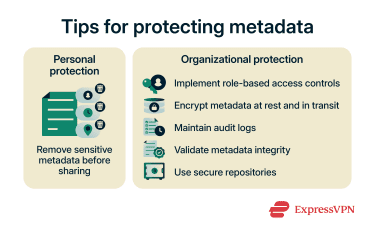
- Remove sensitive metadata before sharing: Metadata can reveal more than the visible content alone. Reviewing and removing unnecessary metadata before sharing helps limit unintended exposure.
- Implement access controls and encryption: Restricting access to metadata helps ensure that only authorized users can view or manage it. Protecting sensitive metadata with encryption at rest and in transit adds another layer of protection, especially in systems where metadata may include sensitive operational or personal information.
- Maintain audit logs: Keeping records of who accessed or changed metadata makes it easier to investigate suspicious activity, support accountability, and meet governance or compliance requirements.
- Validate metadata and secure repositories: Integrity checks, such as checksums or recorded fixities, can help detect tampering, while secure repositories help protect metadata from unauthorized changes or exposure. Clear governance policies also help define ownership, lifecycle management, and update processes.
Also read: How to make your photos more private on social media.
Transparency and control over metadata
Metadata handling varies by platform, file type, and sharing method, so privacy policies and sharing settings matter. Some services or workflows may automatically remove certain metadata, while others may retain it unless the user changes the settings or removes it manually.
Reviewing official privacy documentation and platform settings helps clarify what metadata may be retained, displayed, or removed. This is especially important for photos, documents, and cloud-based services, where metadata may be processed differently depending on the product and sharing method.
Also read: Signal vs. WhatsApp, find out which app protects metadata better.
How to edit or remove metadata
Here are several useful ways to edit or remove metadata on common devices and file types.
Remove metadata from Microsoft Office files
Microsoft recommends using Document Inspector to find and remove hidden data and personal information from Word, Excel, and PowerPoint files. To remove metadata:
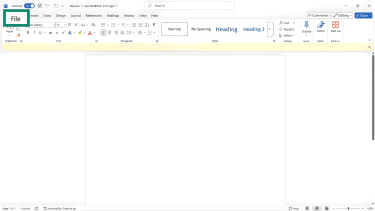
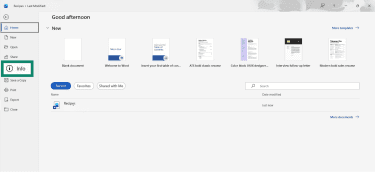
- Open the file in the desktop Office app and click File. Microsoft recommends working on a copy of the original file, because some removed information may not be easy to restore.
- Click Info.
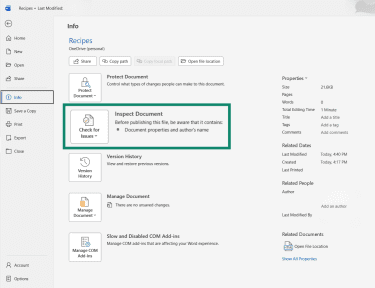
- Click Inspect Document.
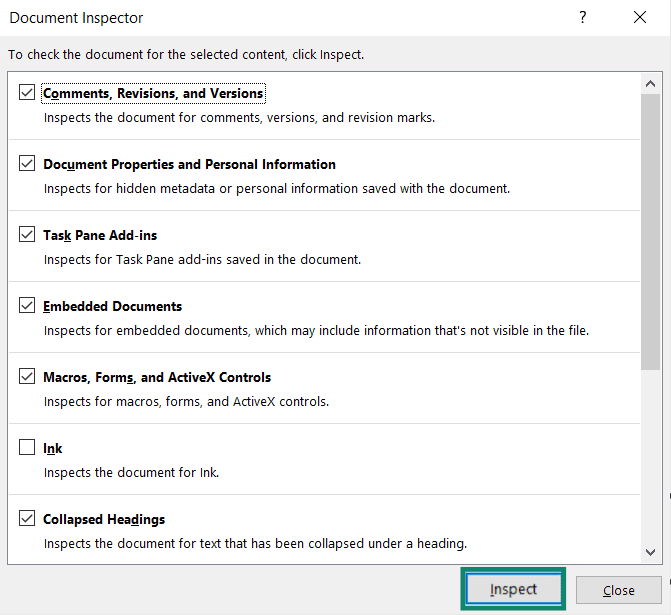
- In the dialog box, choose the categories you want checked, then click Inspect.
- Click Remove All next to any item you want removed.
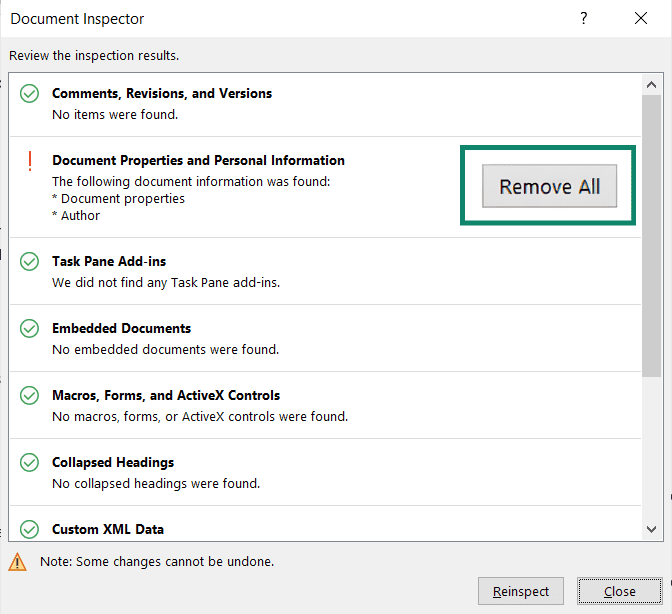
Note: Document Inspector can remove many types of hidden data, but not all data in every file, and some results vary by app or format.
Edit document properties in Microsoft Office
Some metadata fields can also be changed manually instead of being removed:
- Click File > Info.
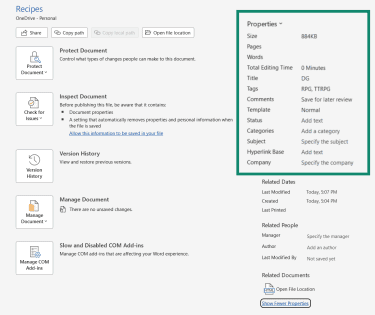
- Under Properties, select Show All Properties.
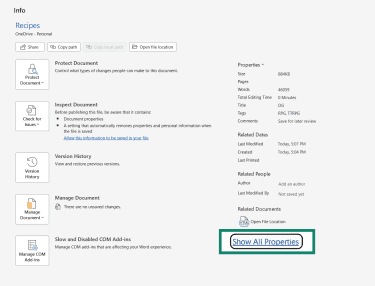
- In the Summary tab, edit fields such as Title, Subject, Author, Keywords, and Comments.
Remove location metadata from photos on iPhone
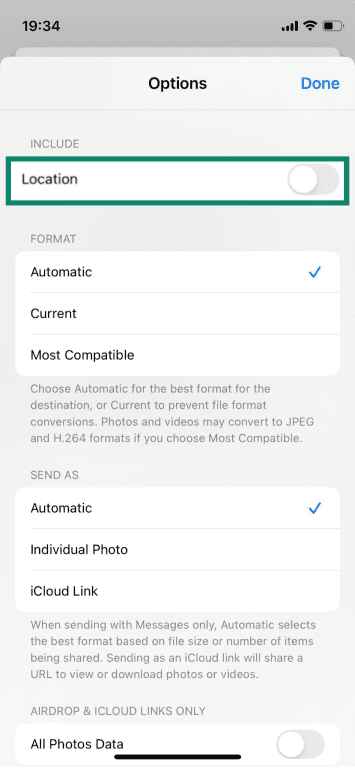
Apple allows location information to be removed at the time of sharing.
- Open the photo in the Photos app and tap Share.

- Tap Options.

- Turn Location off before sending the image. This removes the location metadata from the shared copy rather than from the original photo in the library.
Remove location metadata from photos on Mac
On a Mac, location information can also be removed in the Photos app. Select the photo or photos, then choose Image > Location > Hide Location. If needed, the original location can later be restored by choosing Revert to Original Location.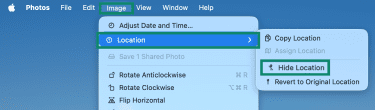
FAQ: Common questions about metadata
What is an example of metadata?
Can metadata be changed or erased?
How can I ensure metadata security?
What are common tools for metadata management?
Take the first step to protect yourself online. Try ExpressVPN risk-free.
Get ExpressVPN





















Comments
Can you elaborate on more about using software, not online services? Like which softwares replaces online services?
Would much appreciate a bit more detail about ImageOptim. What exactly does it do, how should it be configured, what are pitfalls of using it etc. Like any other piece of software, there are tips and tricks and it's very difficult to keep up with the many idiosyncrasies of the various tools you offer for consideration. A deep dive tutorial(admittedly perhaps beyond your intention or time availability to produce such material.) would be helpful. To just take the word of this blogger that this should be used is asking a bit much.
Hi Lexie I found your Metadata article very interesting and you showed us how to remove metadata from files, but what I would like to know is what are the implications of removing it? Will it make it difficult to upload or download files/photos to/from a website or send in an email? Are there any negative implications or is it safe to always remove it? Thanks, and keep up the good work! (And enjoy the pasta:-))