Cloud as a Service (CaaS) explained: How it works, benefits, and real-world examples


Cloud as a Service (CaaS) is a broad term for cloud computing services that are hosted by a third-party provider and made available to customers over the internet, typically on a subscription or pay-per-use basis.
This article explains what CaaS covers, how it works, and what makes it distinct from traditional on-premises IT.
What is Cloud as a Service?
Cloud as a Service (CaaS) isn’t a single product. It's a category of delivery models, each defined by what the provider manages and what the customer controls. That said, in all cases, the provider owns and operates the underlying infrastructure. The customer accesses specific resources over the internet and pays based on usage or subscription terms.
The three primary models are outlined below.
Infrastructure as a Service (IaaS)
IaaS delivers virtualized computing resources, including servers, storage, and networking. The provider manages the physical hardware of the infrastructure, while the customer handles the operating systems, middleware, and applications. Amazon Web Services (AWS), Microsoft Azure, and Google Cloud are the major IaaS providers.
Platform as a Service (Paas)
PaaS sits one level above IaaS. It gives developers a managed environment for building, testing, and deploying applications, while it remains in charge of the underlying servers and, usually, operating systems. Google App Engine and Microsoft Azure App Service are common examples.
Software as a Service (SaaS)
SaaS is the most fully managed model of the three, as it delivers complete applications over the internet. The provider manages everything, including the infrastructure, platform, and software. The customer simply logs in and uses it. Gmail, Slack, and Salesforce fall into this category.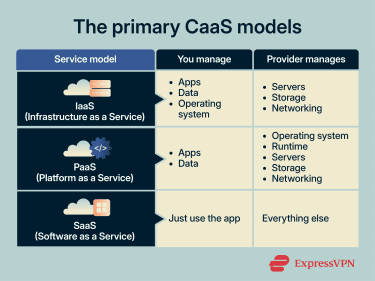
How does Cloud as a Service work?
Cloud providers operate large-scale data centers that house physical servers, storage systems, and networking hardware. When a customer subscribes to a cloud service, they don't interact with that hardware directly. Instead, the provider presents the resources through a software layer, which they can usually access via a web dashboard, API, or command-line interface.
Three core principles define how the model operates in practice:
On-demand infrastructure and services
Cloud resources are provisioned on demand. A customer can create a virtual server, allocate storage, or deploy an application in minutes, without contacting the provider or waiting for hardware.
This is made possible through virtualization, resource pooling, and cloud networking. Providers use virtualization and container technologies to divide physical servers into isolated environments that run independently on shared hardware. These resources are pooled across customers and allocated dynamically based on demand. When a customer requests a resource, the platform assigns capacity from this pool.
The customer doesn't know, or need to know, which physical machine is running their workload because they interact with the resource, not the infrastructure behind it.
Pricing and billing models
When using CaaS, customers pay for what they consume or reserve. Depending on the model or the provider, this can include compute time, storage, bandwidth, or active user seats.
Most providers offer several pricing structures:
- Subscription‑based: Customers pay a fixed monthly or annual fee for a defined set of resources, which simplifies budgeting.
- Pay‑as‑you‑go: Charges are based on actual usage (e.g., compute hours, storage used, or network bandwidth). This model is ideal for workloads with fluctuating demand.
- Tiered pricing: Different service tiers include fixed amounts of resources, allowing customers to choose plans that match their needs. For example, a small startup might begin with a low‑tier instance and scale up as traffic grows.
Cloud platforms track and meter resource consumption automatically.
Scalability and resource flexibility
When using CaaS, customers have the flexibility to scale resources up or down based on workload requirements.
Scaling works in two directions. Vertical scaling adds more power to an existing resource, like increasing CPU or memory. Horizontal scaling adds more instances of a resource to distribute the load. Most cloud platforms support both, and many allow customers to set auto-scaling rules that trigger adjustments automatically when usage crosses a defined threshold.
If demand drops, the business can scale resources back down instead of paying for unused hardware or idle capacity.
Deployment models
CaaS can be deployed in several ways depending on how much control, privacy, and flexibility an organization needs.
- Public cloud: Resources are shared among multiple customers on the cloud provider’s infrastructure. It offers the greatest scalability and cost efficiency but provides less control over physical hardware.
- Private cloud: A single organization leases an isolated cloud environment, either hosted in the provider’s data center or on its own. This model provides greater control and can meet strict security or compliance requirements but is pricier.
- Hybrid cloud: Combines public and private cloud resources, allowing sensitive workloads to remain on-premises while taking advantage of public cloud scalability. This approach is useful for legacy‑heavy industries or for meeting regulatory requirements.
- Multi-cloud: Organizations distribute workloads across multiple cloud providers to avoid vendor lock-in, improve resilience, or access specialized services. Multi‑cloud strategies require careful management to coordinate security, billing, and data movement but can mitigate the risks of relying on a single vendor.
What are the benefits of Cloud as a Service?
Cloud as a Service can help businesses work more efficiently, adapt faster, and avoid many of the limitations of traditional IT setups. It can reduce upfront costs, improve flexibility, and make it easier to scale, deploy, and manage digital services.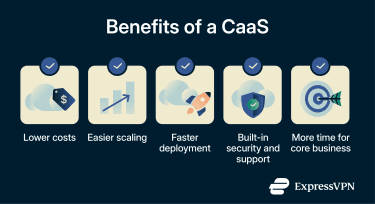
Lower costs and better efficiency
CaaS removes the need to purchase, house, and maintain physical hardware. This shifts IT spending from capital expenditure to operational expenditure, making costs more predictable and easier to scale with actual business needs.
The efficiency gains go beyond hardware. Cloud providers handle patching, updates, and routine maintenance, which frees internal teams to focus on work that's specific to the business, such as improving products, supporting staff, or planning future growth, rather than keeping infrastructure running.
Scalability for business growth
CaaS makes it easier for businesses to grow or scale back without constantly rebuilding their IT setup. That helps companies respond faster to growth, seasonal spikes, or changing workloads.
The scalability makes it easier for organizations to expand into new markets, handle seasonal traffic patterns, or support a growing user base without having to guess future needs or overcommitting to infrastructure they may not need long-term. Startups and smaller companies benefit in particular, as CaaS gives them access to the same caliber of infrastructure as larger enterprises, without the same upfront cost.
Faster deployment and innovation
With CaaS, provisioning infrastructure through a cloud provider takes mere minutes because it’s usually readily available whenever the organization needs it. Teams can spin up environments for development, testing, or staging without waiting for hardware, which shortens the cycle from idea to production.
Cloud platforms also provide access to managed services, such as databases, machine learning tools, analytics engines, and messaging systems, that would take significant time and expertise to build and maintain in-house. This lets teams build on top of existing capabilities rather than starting from scratch, which accelerates development and lowers the barrier to experimenting with new technologies.
Stronger security and managed support
Cloud providers often offer built-in security features such as encryption, threat monitoring, backups, and access controls. That can give businesses a stronger security baseline than they might be able to build and maintain on their own, especially if they have limited in-house resources.
Managed support is another benefit. With many cloud services, the provider handles parts of maintenance, monitoring, and infrastructure support, reducing downtime and taking pressure off internal IT teams. That lets businesses spend less time keeping systems running and more time focusing on their core work.
What are the challenges of using Cloud as a Service?
CaaS offers significant operational advantages, but it also introduces new responsibilities. The main challenges usually involve security, compliance, migration complexity, and the risk of becoming overly dependent on a single provider.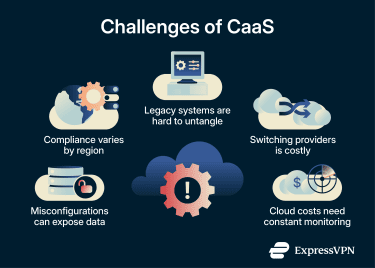
Data security risks
When data moves off-premises and into a third-party environment, the organization no longer has full physical control over where it's stored or how it's protected. Cloud providers implement their own security measures, but the responsibility is shared. The provider typically secures the infrastructure, while the customer is responsible for securing their own data, access controls, and application configurations.
Misconfigurations are one of the most common cloud security concerns. Weak permissions, exposed management interfaces, and poor configuration can all create openings that allow unauthorized access, data theft, or service disruption. Multi-tenant environments also pose a risk, as vulnerabilities at the platform level can potentially affect multiple tenants, despite logical resource isolation.
Compliance and regulatory requirements
Different industries and regions impose specific rules on how data must be stored, processed, and transferred. Meeting these requirements in a cloud environment can be more complex than on-premises because the organization may not have full visibility into where data physically resides.
Some cloud providers offer region-specific data centers and compliance certifications to help address this, but the responsibility for ensuring compliance ultimately sits with the customer, not the provider.
Legacy system migration
Moving existing applications and data from on-premises infrastructure to the cloud is rarely a straightforward process. Older systems may be tightly coupled to specific hardware, operating systems, or software configurations that don't translate directly to a cloud environment.
Some applications can be migrated as-is, often called "lift and shift,” but this doesn't always take full advantage of cloud capabilities. Others require significant rearchitecting before they can run effectively in the cloud. Data migration adds further complexity, especially when dealing with large volumes, proprietary formats, or systems that need to remain operational during the transition.
Beyond the technical challenges, older systems are rarely small or simple. Moving them to the cloud is often less about copying workloads and more about untangling years of accumulated technical debt.
Vendor lock-in concerns
Cloud providers each use proprietary tools, APIs, and service architectures. The deeper an organization integrates with a specific provider’s ecosystem, the harder and more expensive it becomes to move workloads to another platform. This dependency can affect pricing leverage, limit future flexibility, and create risk if the provider changes its terms, raises prices, or discontinues a service.
Some organizations mitigate this by adopting multicloud strategies or using open-source tools and standards that are portable across providers. But in practice, fully avoiding vendor lock-in requires deliberate architectural decisions from the start.
What industries benefit most from Cloud as a Service?
CaaS is used across virtually every sector, but some industries benefit more than others. The following industries tend to benefit most because they often face changing demand, large volumes of data, or pressure to modernize quickly.
- Healthcare: Hospitals, clinics, and health tech companies use CaaS to manage electronic health records, medical imaging, and telehealth platforms. Cloud providers with Health Insurance Portability and Accountability Act (HIPAA) certifications help meet regulatory requirements without the need for in-house data center infrastructure.
- Financial services: Banks, insurers, and fintech companies use cloud infrastructure to process transactions, run risk models, and detect fraud. Many use hybrid or private cloud deployments to keep sensitive data in controlled environments while running other operations on public platforms.
- Technology startups: CaaS gives startups access to production-grade infrastructure, which allows them to manage compute, storage, and databases and use DevOps tools without large upfront investment.
- Retail and e-commerce: Retail and e-commerce businesses benefit from CaaS because it lets them scale infrastructure to match demand during sales events or holiday spikes rather than provisioning for peak capacity year-round. Cloud platforms also support inventory management, personalization, payment processing, and logistics across regions.
Real-world examples of Cloud as a Service
The easiest way to understand Cloud as a Service is to look at what businesses actually use it for.
Note: This section is for informational purposes only. Organizations should evaluate cloud services according to their own needs and compliance obligations.
Cloud storage solutions
Cloud storage is one of the clearest examples of CaaS. Services like Amazon S3, Google Cloud Storage, and Microsoft Azure Blob Storage allow organizations to store and retrieve data over the internet without managing physical storage hardware. This becomes especially useful when storage needs don’t grow in a predictable way.
Another important benefit is that providers handle redundancy and availability behind the scenes. Data is typically replicated across multiple locations, so if one server or data center goes down, the data is still accessible from another. Businesses use it for a wide range of purposes, from application data and backups to media hosting and long-term archiving.
Collaboration and productivity platforms
Another everyday example is the cloud-based workspace people use to create, store, share, and update files together. Platforms like Google Workspace, Microsoft 365, and Slack give teams access to email, document editing, file sharing, messaging, and video conferencing from any device with an internet connection.
For organizations, there's nothing to install, update, or maintain on the customer's side; the provider delivers the applications, storage, syncing, and access layer together over the internet.
Industry-specific cloud applications
Cloud as a Service also shows up in software built for a specific sector. In healthcare, platforms like Epic Systems deliver cloud-based electronic health records that connect hospitals, clinics, and patients through a single system. In life sciences, Veeva built its entire platform around cloud-hosted tools for managing clinical trials and regulatory submissions. Salesforce took a different path, starting as a general-purpose cloud customer relationship management (CRM) platform before expanding into industry-specific versions for healthcare, financial services, and manufacturing.
How can businesses transition to Cloud as a Service?
Moving to the cloud involves more than flicking a switch. A structured approach helps minimize risk and maximize return on investment.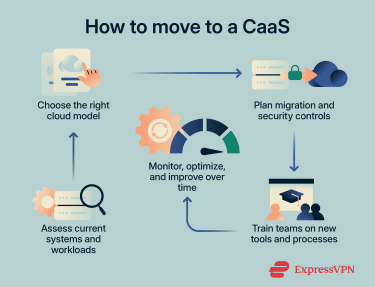
Assess current infrastructure
Before choosing a cloud provider or model, organizations need a clear picture of their existing IT environment. That means documenting what hardware, software, and services are currently in use, how they depend on each other, and which workloads are good candidates for migration.
It’s also important to understand your business drivers: are you looking to cut costs, improve agility, meet compliance requirements, or all of the above? This assessment phase is what helps organizations avoid surprises later in the process and prioritize which workloads to move first.
Learn more: What is network mapping?
Choose the right cloud model
Once the assessment is done, the next decision is which cloud model fits the organization's needs. That includes both the service model (IaaS, PaaS, or SaaS) and the deployment model (public, private, hybrid, or multicloud).
The right choice depends on factors like the sensitivity of the data, regulatory requirements, the level of control the organization needs, and budget. A startup building a new product might go straight to a public cloud with managed services. A financial institution handling regulated data might opt for a hybrid setup that keeps sensitive workloads in a private environment. Most organizations end up using a mix, choosing different models for different workloads based on what each one requires.
Plan migration and security controls
With a cloud model selected, the next step is planning the actual migration. That means building a roadmap that outlines which systems move first, how data will be transferred, and whether the organization will take an incremental approach or migrate everything at once.
Security should be part of this planning from the start. This includes configuring identity and access management (IAM), setting encryption policies, and putting monitoring tools in place. Compliance requirements like data residency and audit logging should also be addressed during this phase, since retrofitting them later is harder and riskier.
Educate and train personnel
Cloud adoption introduces new tools, workflows, and responsibilities. Teams that manage on-premises infrastructure will need training on cloud architecture, security practices, and cost management. It also helps to communicate the reasons behind the transition early so that people across the organization understand what is changing and why, rather than learning about it as it happens.
Learn more: Cybersecurity tips for small businesses
Optimization and monitoring
After migration, cloud environments need ongoing attention to stay efficient and secure. That includes monitoring resource usage to catch waste, reviewing security configurations regularly, and adjusting scaling policies as workloads change. Organizations that treat cloud management as a continuing effort rather than a one-time project tend to get more value out of it over time.
FAQ: Common questions about CaaS
What is the difference between Cloud as a Service and SaaS?
What are the main benefits of Cloud as a Service (CaaS)?
What are the challenges of Cloud as a Service (CaaS)?
How secure is Cloud as a Service?
What industries use Cloud as a Service?
How can a business move to Cloud as a Service?
Take the first step to protect yourself online. Try ExpressVPN risk-free.
Get ExpressVPN