What is MCP in AI? How the Model Context Protocol powers smarter AI systems


The Model Context Protocol (MCP) is attracting growing attention as AI systems become more capable and interconnected. Since its introduction by Anthropic in November 2024, MCP has gained broad ecosystem support, with a growing registry of public servers and official software development kits (SDKs) for many major programming languages.
What is Model Context Protocol?
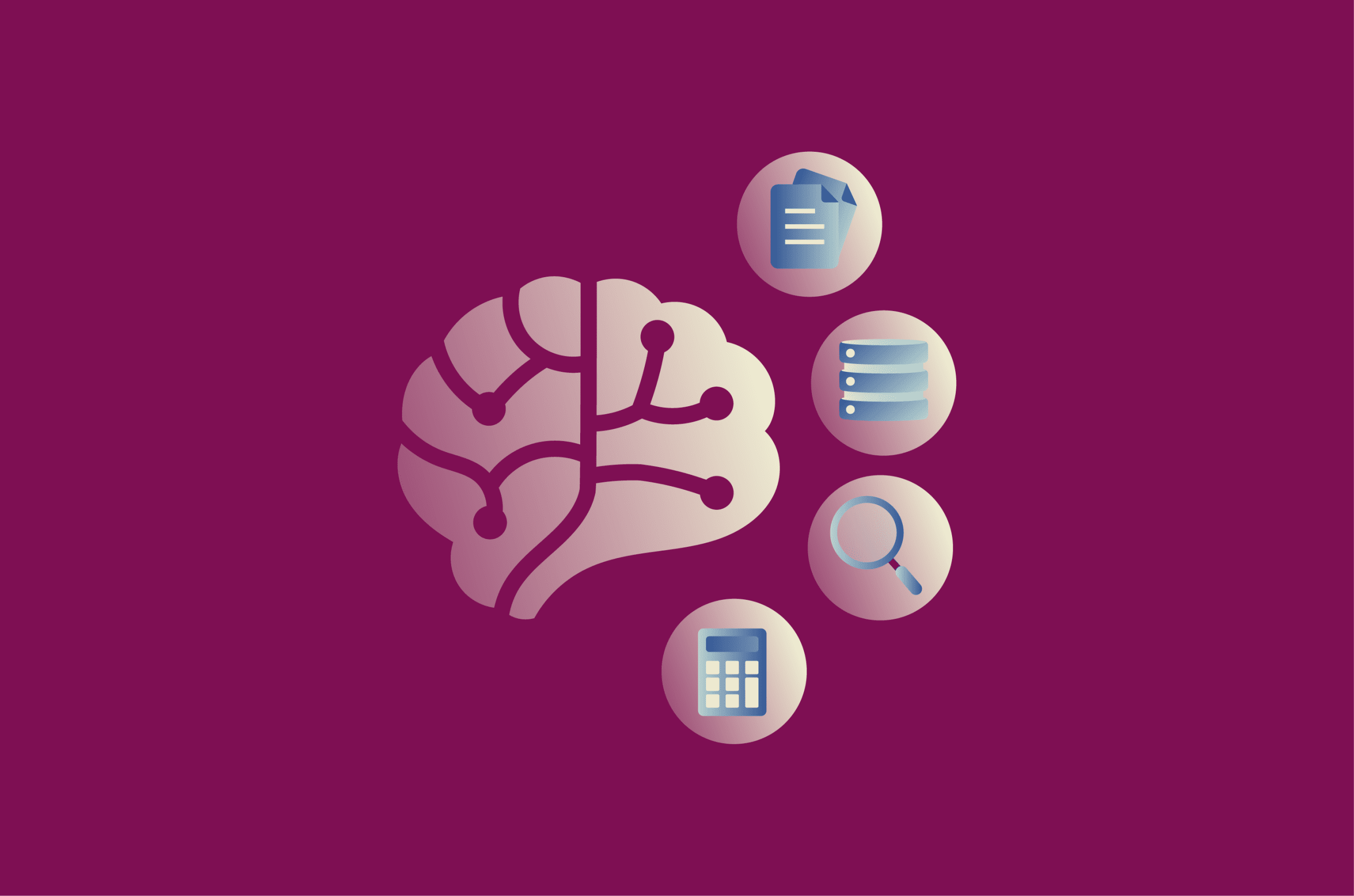
MCP is an open protocol for connecting AI applications to external systems, including data sources such as local files and databases, tools such as search engines and calculators, and workflows such as specialized prompts. Before MCP, each new data source or tool required its own custom integration. That fragmentation made it difficult to scale truly connected AI systems; MCP provides a shared protocol for these integrations.
This matters because an AI model can only work with what's available in its context window. It draws on training data and the information included in a prompt, but it doesn't automatically have access to a company database, project files, or a live support system. MCP provides the surrounding application with a structured way to connect to approved external systems and retrieve relevant context or trigger permitted actions. It doesn't make the model more capable on its own, and the host application still controls what the model can access and how tool use is handled.
Also read: What is a neural network, and how does it work in AI?
What MCP helps AI systems access
What an AI application can access through MCP depends on which MCP servers are connected to it. Servers can expose three core features:
- Tools: Executable functions the model can use, through the host application, to perform actions such as application programming interface (API) calls, database queries, or computations.
- Resources: Data sources that provide contextual information, such as file contents, database records, or other structured data.
- Prompts: Reusable templates that help structure interactions with the model, such as guided workflows or few-shot examples.
MCP standardizes the connection itself; it doesn't automatically grant access to every system. Access should be governed by the host application, connected servers, user permissions, and security controls such as clear tool visibility, confirmation prompts, and human oversight for sensitive actions.
How the Model Context Protocol works
MCP follows a client-server architecture in which an MCP host, such as an AI application, establishes connections to one or more MCP servers by creating one MCP client for each server. Each client maintains a dedicated connection with its corresponding server.
MCP consists of two layers. The data layer defines the JavaScript Object Notation-Remote Procedure Call (JSON-RPC) 2.0-based protocol for client-server communication, including lifecycle management and core primitives such as tools, resources, prompts, and notifications. The transport layer defines the communication mechanisms between clients and servers, including connection establishment, message framing, and authorization.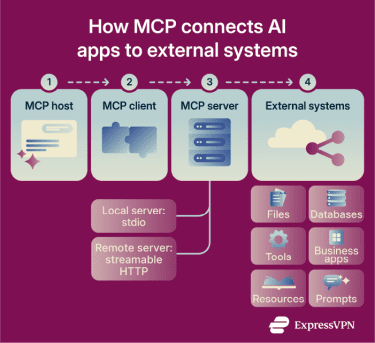
Core MCP architecture
- MCP host: The AI application that coordinates and manages one or more MCP clients. This could be an AI assistant, a coding tool, or any other application that needs outside context to complete a task. Rather than connecting directly to servers, the host creates a separate client for each server it needs to reach.
- MCP client: A component that maintains a dedicated connection to an MCP server and obtains context from it for the host to use. This one-client-per-server structure keeps connections organized. For example, if a host connects to three servers, it maintains three separate clients, each responsible for one.
- MCP server: A program that provides context and capabilities to MCP clients, running either locally or remotely. A local filesystem server typically uses the stdio transport, whereas remote servers typically use the Streamable HTTP transport.
Context flow and bidirectional communication
When a client connects to a server, the two first negotiate the capabilities each side supports (such as tools, resources, or prompts) before normal context exchange begins. After initialization, the client can request a list of what the server exposes, so the AI application knows what is available before trying to use it.
MCP is designed to keep requests self-contained where possible. Tool discovery and notifications can make interactions feel stateful, but that doesn't mean the server must remember the full history of prior exchanges. Some transports or implementations may add session-like behavior, but this is implementation-specific.
Notifications allow servers to inform connected clients of real-time updates; for example, when a new tool becomes available or an existing one changes, keeping the application's view of available context current throughout a session.
How MCP connects AI models to tools and data
The primitives don't all work the same way. They represent three distinct interaction patterns: tools are model-controlled, meaning the model can discover and invoke them subject to the host's implementation and permissions; prompts are user-controlled, meaning the user explicitly triggers them; and resources are application-driven, meaning the host decides how to surface them as context.
As a concrete example, an MCP server connected to a database could expose a tool for querying the database, a resource containing the database schema, and a prompt with few-shot examples for interacting with the tools. The host application still governs what is exposed, how tool calls are approved, and how results are presented; MCP defines the connection, not the decision-making.
Why MCP is becoming important for AI
As AI applications become more capable, the demand for real-time data access and multi-step task execution is growing, and so is the need for a consistent way to connect AI systems to the tools and data sources that support them.
MCP and the rise of AI agents
MCP is also gaining traction because of the rise of AI agents. Unlike a traditional chatbot, AI agents can pursue goals, use tools, and take actions with varying degrees of autonomy, including performing multi-step tasks.
To do that reliably, they need a structured way to discover what tools are available and access approved context at runtime. Anthropic introduced MCP to help AI systems, including agents, connect to external tools and data sources, retrieve relevant information, and better understand the context around a task.
In more advanced workflows, an agent might retrieve information from one system, use a tool in another, and ask the user for approval before taking the next step, a pattern MCP's host-client-server structure is designed to support. MCP's tool guidance also recommends clear user visibility and human approval for operations where needed.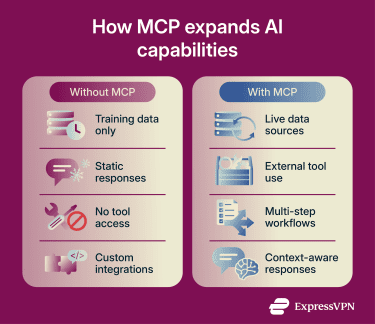
How MCP can help reduce some AI errors
One reason organizations are exploring MCP is that a better context can lead to more accurate responses. Large language models (LLMs), used on their own, have important limitations: their knowledge may be limited to their training data, and they don't automatically interact with external systems, so they can't access real-time data or perform actions such as updating a record. MCP can help reduce some context-related errors by giving AI applications a clearer path to approved external data sources, making responses more grounded in current information.
That said, MCP doesn't guarantee accurate answers or eliminate AI hallucinations. A model can still misunderstand information, misuse a tool, or produce incorrect output, even with access to outside data. MCP improves the application's ability to reach relevant context, but response quality still depends on the model, the connected systems, and how the application uses what it receives.
MCP vs. API
MCP is a type of API, specifically designed for AI applications. Traditional APIs provide a defined way for one software system to communicate with another, usually through documented endpoints, request formats, and response formats.
MCP builds on that idea: rather than defining a custom connection for each tool or data source, it provides AI applications with a standardized way to discover and use a wide range of external tools, resources, and prompts through a shared protocol.
A simple way to think about it is that an API is usually a specific gateway to a system. MCP is a common structure that helps AI applications work with many systems without every connection needing to be built from scratch.
How MCP differs from APIs
One major difference is dynamic discovery. Many traditional APIs rely on developer-facing documentation or separate API specifications to explain what a service can do. MCP servers expose capabilities in a structured format that clients can query, such as available tools, resources, and prompts. This can reduce manual integration work when connecting AI systems to new tools or changing environments.
Many representational state transfer (REST)-style APIs are stateless, meaning each request carries the information needed to process it.
When MCP makes more sense than custom API integrations
The more useful distinction isn't between MCP and APIs as competing technologies, but about who is consuming the functionality. When a developer is writing code to call a specific service, a traditional API integration is straightforward and often sufficient.
MCP makes more sense when the consumer is an AI application or agent using an LLM: a system that needs to discover what's available, decide what to call, and act across multiple systems within the permissions and controls set by the host application. Instead of a developer hardcoding every tool call or integration path, MCP gives the AI application a standardized way to access tools, resources, and prompts. That's why MCP is gaining traction in AI assistants, coding tools, and agentic workflows.
MCP vs. RAG
Retrieval-augmented generation (RAG) is an approach for improving AI model performance by connecting it to external knowledge bases, giving it access to information beyond its training data before generating a response.
MCP and RAG both help AI systems use outside information, but they operate at different layers and solve different problems. The main difference is that MCP can be used to retrieve data or perform actions via external tools, whereas RAG is primarily used to retrieve information that grounds an AI-generated response.
Key differences between MCP and RAG
| MCP | RAG | |
| Main purpose | Connect AI applications to external tools, data, services, and workflows | Retrieve relevant information to improve an AI-generated response |
| Interaction type | Two-way interaction with external systems | Mostly one-way retrieval from a knowledge source |
| Common output | A response based on tool calls, retrieved context, or external actions | A response grounded in retrieved text or documents |
| Best fit | AI agents, tool use, live data access, and multi-system workflows | Search, question answering, document summaries, and knowledge-base responses |
| Limitation | Requires careful permissions, server setup, and tool design | Usually doesn't execute actions or coordinate tools by itself |
How MCP and RAG can work together
MCP and RAG are often complementary rather than competing. MCP can supplement RAG by connecting to a vector database through an MCP server, for example, by exposing semantic search as a tool or resource. This lets an AI application reach the retrieval system alongside other tools and data sources, and can allow further tool-calling after relevant data is retrieved.
In practice, RAG handles retrieval and grounding, while MCP provides the broader connection layer that lets an AI application access retrieval systems, live tools, APIs, and workflows.
Which approach is better for modern AI applications?
Neither is universally better; they solve different problems. RAG is the stronger fit when the goal is to ground responses in a trusted knowledge base. MCP makes more sense when the AI application needs to interact with external systems, use tools, or coordinate workflows. Many production systems use both: RAG for retrieval from a pre-built index and MCP to invoke live tools and APIs at runtime.
Common use cases for MCP in AI
MCP is most useful when an AI application needs to work with information or tools outside its built-in context.
AI assistants and chatbots
AI assistants and chatbots can use MCP to access approved apps and data sources before responding, such as a connected calendar, workspace tool, or internal knowledge base, to provide a more relevant answer. In a business setting, this means users can ask questions in natural language rather than manually searching across several systems.
Agentic AI workflows
MCP supports agentic workflows where an AI system does more than answer a single question. For example, an agent could check a database, summarize the result, ask for user confirmation, and then update a record through an approved tool, using outside capabilities step by step based on what connected MCP servers make available.
Also read: What is agentic AI and how does it work?
Enterprise knowledge systems
MCP can connect AI applications to internal knowledge systems, such as document repositories, research databases, case files, or approved company knowledge bases, which is particularly useful in industries where accuracy and traceability matter.
For instance, Thomson Reuters, a global content and technology company, announced an MCP integration in May 2026 that connects Claude directly to CoCounsel Legal, allowing legal professionals to move work between Claude and CoCounsel Legal's citation-supported legal workflows.
Real-time data retrieval
MCP can also support AI applications that need up-to-date information (such as a support ticket, product record, or live business system) by giving the AI a structured way to request and use that data as context before responding, rather than relying on what was available during training.
AI coding and development tools
MCP is particularly useful in coding environments, where assistants often need project-specific context such as repository files, documentation, issue trackers, or build tools. MCP provides development tools with a structured way to connect an AI assistant to those sources, helping it understand the codebase relevant to a task rather than relying solely on the user's prompt.
Benefits of using MCP
MCP's main value is providing AI applications with a cleaner way to connect to surrounding systems. The benefits depend on how servers are built, what data they expose, and how carefully access is controlled.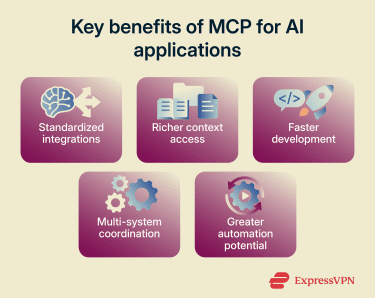
Standardized AI integrations
Instead of designing a separate integration pattern for every data source or tool, developers can build around a shared protocol, reducing fragmentation as AI applications connect to more files, databases, apps, and workflows.
Improved context awareness
Rather than relying only on the user's prompt, an AI application can request approved information from connected systems when a task requires it, retrieving the right file, record, or tool output before responding. Response quality still depends on how the application uses that context.
Faster development workflows
Once a team knows how to build or connect to an MCP server, it can reuse the same approach across different data sources, reducing the amount of custom integration work for assistants, agents, and development tools, though complex systems still require careful implementation.
Better multi-system communication
MCP provides an AI application with a shared structure that enables working across multiple systems without treating each connection as a separate project. Each system keeps its own data, permissions, and rules, while MCP standardizes how the application connects to and uses approved capabilities.
Increased automation potential
Because MCP servers can expose tools, an AI application can perform approved actions such as querying a database, calling an API, or working with files, creating more room for task-based automation when tied to clear permissions and appropriate user approval.
Challenges and security considerations
MCP isn't unsafe by default, but it can expand what an AI application can reach. Once a system connects to files, databases, tools, or external services, the risk depends on what those connections can access and what actions they can perform. A low-risk local tool, a remote third-party server, and a write-capable connector to sensitive business data all create different levels of exposure.
Security and data access concerns
The biggest concern is data access. An MCP server can expose resources, tools, or actions to an AI application, and a poor setup can expose more than intended. Key risks include:
- Tool poisoning: An attacker runs a malicious MCP server whose tools look normal, but whose responses contain hidden instructions. If those instructions enter the model's context without proper client-side safeguards, they may influence the model to call unsafe tools, leak data, or ignore higher-priority instructions.
- Prompt injection: Malicious instructions hidden in external content, such as documents, websites, or tool outputs, cause an LLM to ignore legitimate instructions and take unintended actions.
- Excessive permissions: An MCP server that exposes more data or functionality than necessary increases the risk of accidental access, misuse, or data leakage.
- Untrusted third-party servers: Remote MCP servers become part of the application's trust boundary. A poorly maintained or malicious server may expose data or manipulate tool behavior unexpectedly.
- Confused deputy problems: In some MCP proxy/Open Authorization (OAuth) setups, attackers can exploit authorization flows to obtain authorization codes without proper user consent, especially where static client IDs, dynamic client registration, and consent cookies interact in unsafe ways.
- Token misuse: MCP servers should validate that access tokens were issued specifically for them and shouldn't pass received tokens through to upstream APIs.
Write actions raises the stakes further. A read-only tool returns information; a write-capable tool can update a record, send a message, modify a file, or trigger a workflow. That doesn't make write actions off-limits, but they require more caution than simple retrieval.
Infrastructure requirements
MCP can add infrastructure complexity because servers may run locally, remotely, or in a mix of both, and each setup doesn't carry the same risk. A local file server, a remote customer database connector, and a third-party MCP server each create different trust boundaries, requiring teams to understand where each server runs, what it can access, how it authenticates users, and how data moves between systems.
Visibility compounds this at scale. Organizations need a clear inventory of existing MCP deployments, authenticated server connections, and audit logging or audit trails where required; otherwise, it becomes difficult to track which tools were used, what data moved through a workflow, or how a server change affected connected applications.
Implementation complexity
MCP can reduce some integration work, but it doesn't eliminate implementation complexity. Teams still need to define what each server exposes, how tools are described, how errors are handled, and how the application should behave when a tool returns unexpected results.
There's also a lifecycle challenge. MCP servers may be created, updated, or retired over time, and a server that changes what it exposes can cause a connected application to behave differently. That makes versioning, testing, and change management essential parts of any serious MCP deployment.
Scalability challenges
MCP can also become harder to manage as the number of servers, tools, and users grows. A small setup with one local server is very different from an organization-wide setup with multiple remote servers connected to internal systems.
At scale, the main challenge is consistency. Different teams may build MCP servers with different tool names, descriptions, permission levels, and data formats. If those choices aren't coordinated, AI applications may receive uneven context or expose overlapping capabilities.
Scalability also affects security and governance. As more MCP servers are added, organizations need a clearer view of which servers exist, who owns them, what they expose, and how changes affect connected AI applications. Without that, the MCP ecosystem can become difficult to audit and maintain.
Also read: A guide to understanding and implementing AI security.
Best practices for implementing MCP
MCP works best when teams treat it as an access layer, not just a convenience layer, connecting AI applications to useful context while keeping control over what data is shared, which tools can be used, and when a human needs to approve an action.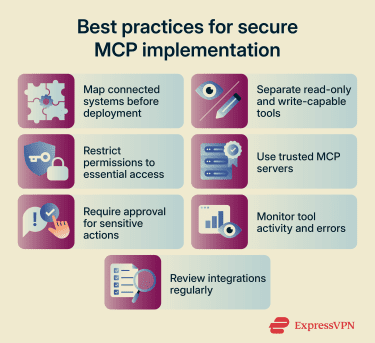
Preparing your AI infrastructure
Before connecting an AI application to MCP servers, map the systems it may touch: data sources, user groups, tool permissions, authentication requirements, and any sensitive information that should stay out of scope. Separating read-only actions from write-capable ones early prevents overbroad access. An assistant that only needs to query a knowledge base doesn't need access to every file or workflow in the organization.
Choosing the right MCP architecture
The safest architecture depends on where the server runs and what it can do. For simpler use cases, read-only tools and narrowly scoped resources are often enough. For higher-risk cases (remote servers or write-capable tools), add stronger authentication, authorization, logging, and human approval. Use servers from trusted providers or servers your team can review, control, and update directly.
Integration strategies for production environments
Production deployments require controls beyond a working connection: least-privilege permissions, per-tool approval rules, clear, reviewed tool descriptions, secure authentication, and separate handling for read-only and write-capable tools.
For HTTP-based remote servers, MCP supports authorization flows for protected resources, allowing clients to make requests on behalf of users. Avoid broad access when a narrower scope works.
Monitoring and optimizing MCP performance
MCP integrations shouldn't be treated as set-and-forget connections. Servers may add tools, change descriptions, or expose new data over time; monitoring helps teams track which tools were invoked, what errors occurred, and whether server behavior changed. Regular reviews matter too: a server that was appropriate for a small test may not be suitable for a wider rollout.
Common misconceptions about MCP
MCP is a protocol for connecting AI applications to external context and capabilities. It can work alongside APIs, retrieval systems, and plugins, but it isn't the same as any of them.
MCP is not just another API framework
MCP doesn't replace APIs. In many cases, an MCP tool calls an API behind the scenes. The difference lies in where MCP sits in the stack: APIs define how software systems exchange data, while MCP provides AI applications with a consistent way to discover and use those capabilities through tools, resources, and prompts. For a full comparison, see the MCP vs. API section above.
MCP does not replace RAG
MCP doesn't replace RAG either. RAG remains the stronger fit for retrieving relevant information from a knowledge base to ground an AI-generated response. MCP is broader in that it can also connect to tools, services, and workflows. In many systems, RAG is simply one capability exposed through MCP. For more details, see the MCP vs. RAG section above.
The future of MCP in AI
MCP is still developing, and its long-term role will depend on how well the ecosystem handles standardization, security, and governance.
Standardization across AI ecosystems
One likely direction is broader standardization. MCP was created to give AI applications a common way to connect to external systems, and that idea is now extending beyond a single company or product.
A major step in that direction came when Anthropic donated MCP to the Agentic AI Foundation, a directed fund under the Linux Foundation. The goal is to keep MCP open, vendor-neutral, and community-driven as more companies build AI tools that need shared ways to connect with external systems.
That doesn't mean MCP will become the only standard for connected AI. But if adoption continues, it could become a common layer for connecting AI assistants, coding tools, enterprise systems, and cloud services.
MCP and autonomous AI systems
As AI agents take on more complex, multi-step tasks, the governance question becomes harder to answer. The more a connected system can do through external tools, the more important it becomes to define clear boundaries around access, approval, and sensitive actions, and to ensure those boundaries remain in place as agent capabilities grow.
MCP's structured approach to tool discovery and capability exposure is one piece of that puzzle, but the broader challenge of governing autonomous AI behavior goes well beyond any single protocol.
Emerging security and governance challenges
The future of MCP will depend as much on trust as on adoption. According to Anthropic and the MCP project, MCP has reached over 97 million monthly SDK downloads and around 10,000 active servers, placing it at a scale where security and privacy controls must be robust and consistent across a wide range of deployments.
That means treating MCP as part of broader AI risk management rather than a purely technical integration, with strong authentication, authorization, logging, consent flows, and regular server review becoming more critical as the ecosystem grows. For organizations using MCP with sensitive systems, the goal should be the right access with clear limits, not maximum access.
FAQ
Does ChatGPT use MCP?
Is MCP open source?
Can MCP work with existing AI models?
What programming languages support the Model Context Protocol (MCP)?
Is MCP only useful for enterprise AI?
Can Model Context Protocol (MCP) improve AI accuracy?
What industries benefit most from Model Context Protocol (MCP)?
Is Model Context Protocol (MCP) difficult to implement?